IMG_8381_608pxBreite

Christian Drapatz

AtomiumGames / OneTwoApps

by Christian Drapatz

AI Tools for App Development on macOS

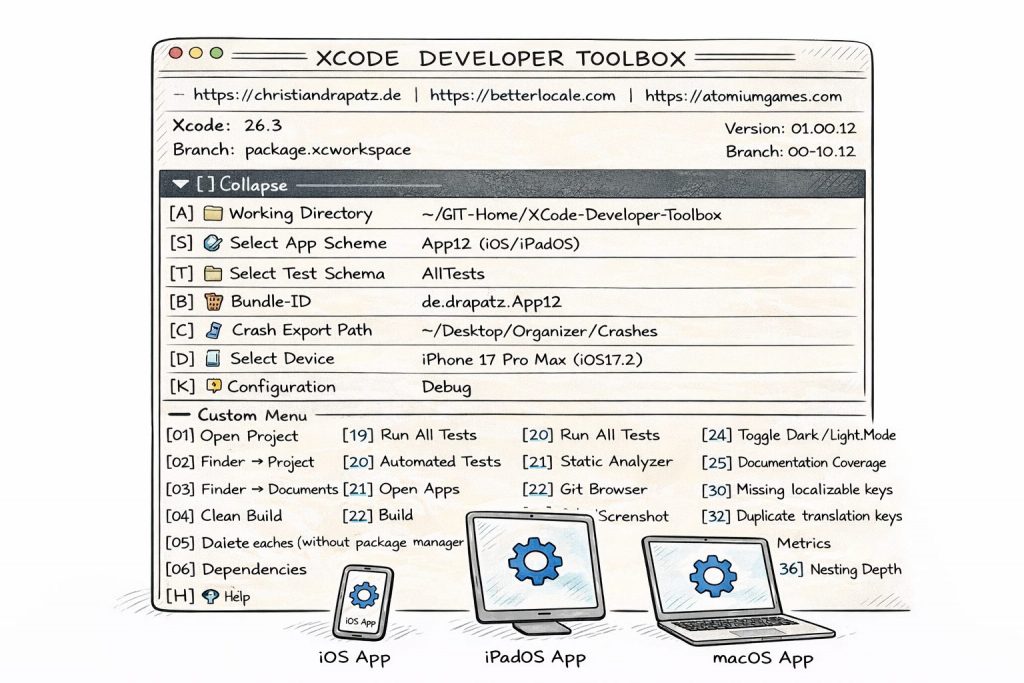
Our macOS apps support developers with the everyday tasks that often consume a lot of time but add little value. They help you organize content cleanly, document it in a reusable way, and keep it consistent across projects, instead of dealing with folder chaos, copy and paste workflows, and manual tracking lists.
A key focus is text-related work in software projects, including localization, App Store content, technical documentation, and structured post-analysis of crash reports. The goal is to make information easier to access, simplify comparisons, and capture results in a way that remains understandable and reusable later.
AI can optionally support these workflows, for example for drafting, translating, or summarizing content. It is not required. If you prefer to work without AI, everything can be handled manually or through templates that you run in external tools. If you choose to integrate AI, you can speed up your workflow while staying fully in control of what is sent.
Openness matters to us. Instead of being tied to a single provider, you can choose between different services depending on your needs, including OpenAI, Google Gemini, Anthropic Claude, Perplexity AI, and DeepL, and compare results. At the same time, all data remains local on your Mac, with no cloud dependency and no automatic data transfer.

BetterLocale Crash

AI-supported localization for Xcode projects

First release: January 2026

Mac-256@2x
BetterLocale Crash hilft dir, iOS- und macOS-Crashlogs schnell zu verstehen und sauber zu dokumentieren. Während klassische Monitoring-Tools zuverlässig melden, dass ein Fehler passiert ist, setzt BetterLocale Crash beim Warum an. Die App importiert Crash- und Logdateien, reduziert umfangreiche Reports automatisch auf die relevanten Stellen und macht sie dadurch besser vergleichbar.
Beim Laden werden aussagekräftige Stackframes herausgefiltert, Ursachen lassen sich gezielter eingrenzen, und Duplikate werden versions- und thread-unabhängig erkannt. So bleibt auch ein großer Crash-Bestand übersichtlich, und du arbeitest nicht ständig dieselben Varianten durch.
Für die Analyse hast du drei Wege, je nach Setup und Arbeitsstil. Du kannst alles komplett manuell machen und deine Bewertung, Ursache und Notizen direkt im Editor festhalten. Wenn du KI nutzen willst, aber keinen eigenen Account oder API-Key hast, erstellt BetterLocale Crash strukturierte Vorlagen, die du in einem externen KI-Client wie ChatGPT ausführen kannst. Das Ergebnis übernimmst du anschließend per Zwischenablage zurück in die App. Und wenn du bereits einen Account bei einem Anbieter hast, kannst du Analysen direkt in der App erzeugen lassen. Das ist optional, spart aber spürbar Zeit, weil der Schritt über externe Tools entfällt und Ergebnisse direkt gespeichert werden.
Optionaler Source-Code kann als Kontext ergänzt werden. Crashes lassen sich filtern, gruppieren und über Statuswerte verwalten. Alle Daten bleiben lokal auf deinem Mac. Unterstützt werden unter anderem OpenAI, Google Gemini, Anthropic Claude, Perplexity AI und xAI Grok. BetterLocale Crash ist bewusst kein Monitoring-Tool wie Sentry, sondern ein Werkzeug für strukturierte Nachanalyse, Vergleich und Dokumentation von Crashlogs.

BetterLocale Code

AI-supported localization for Xcode projects

First release: January 2026

BetterLocaleCodeIcon256x256
BetterLocale Code is a macOS tool that makes Xcode localization finally feel the way developers expect it to. Instead of getting lost in .lproj folders, .strings files, and multiple .xcstrings versions, you manage everything in one central editor built around your Xcode project. You instantly see which keys are missing, where translations are incomplete, and which languages are out of sync. No searching, no guesswork, no endless copy and paste.
The real strength lies in the translation workflow. You can bring your app into virtually any language without setting up an expensive or slow process. If you want, you can use AI directly inside the app with your own provider accounts, such as OpenAI, DeepL, Gemini, Claude, or Perplexity. You decide how much context to provide, what level of quality you expect, and how you manage costs. If you prefer not to use direct API integration, BetterLocale Code generates structured templates and instructions that you can run in external tools like ChatGPT. You then copy the results back and continue managing everything in one place.
Because BetterLocale Code works directly with your project, it fits naturally into your Xcode workflow. You are not translating “somewhere else,” but directly at the strings that will actually be part of your build. Conversions between XCStrings and .strings are done with a single click, and you can iterate quickly because updated texts are immediately available in your project. In the end, it is an ideal complement to Xcode. Xcode supports localization, but BetterLocale Code makes it faster, clearer, and more cost-efficient, especially when working with many languages and frequent updates.

BetterLocale Store

AI-supported localization for App Store Connect metadata

First release: January 2026

BetterLocaleAppsIcon256x256
BetterLocale Store makes App Store localization on macOS finally stress-free. You manage all your App Store Connect texts in one place instead of jumping through countless tabs, copy-paste snippets, or outdated Excel files. You instantly see which languages are incomplete, where text exceeds limits, and whether your content stays consistent across all localizations. This keeps your App Store presence aligned, even if you frequently refine texts or add new languages.
Translation is flexible and adapts to your workflow. If you prefer not to use your own AI account, the app can generate structured templates and translation prompts for external tools like ChatGPT. You run the translation there and paste the result back into BetterLocale Store. If you already use AI services, you can trigger translations directly inside the app via API, for example with OpenAI, DeepL, Gemini, Claude, or Perplexity. Your data remains local on your Mac, and any usage costs are handled only through your own provider accounts.
In short, BetterLocale Store takes care of the tedious part: keeping content organized, identifying gaps, maintaining clean metadata, and integrating translations into a controlled workflow. It is ideal for indie developers and teams who want to manage App Store metadata quickly, consistently, and affordably across multiple languages.

BetterLocale Doc

AI-supported localization for all kinds of texts, documents, and web content

First release: February 2026

Mac-128
BetterLocale provides AI-assisted translations for almost any type of content. Whether it is short UI text, longer documents, website content, app copy, or technical documentation, everything is handled in a single central editor so you do not have to switch constantly between different tools.
The app gives you full control over how you want to work. You can create and manage translations entirely manually inside the editor if you prefer maximum control or want to avoid using AI. Alternatively, BetterLocale can generate structured AI prompts that you execute in an external AI client such as ChatGPT. You then paste the result back into the app, without needing to configure an API key inside BetterLocale itself.
If you already have an account with an AI provider, you can trigger translations directly within the app. Currently supported services include OpenAI, DeepL, Gemini, Claude, and Perplexity. You decide which provider to use, can compare results, and choose the option that best fits your tone, quality expectations, or cost requirements.
No matter which workflow you choose, you can always add context, instructions, or style guidelines to ensure the translation matches your target audience and purpose. The app remains flexible and does not force you into rigid formats. It works just as well for quick one-off translations as it does for larger projects across multiple languages.

BetterLocale MarkDown

Markdown redefined – with AI and workflow automation

Available from the end of February 2026

CarPlay-60@3x
The new BetterLocale MarkDown app is a modern Markdown editor with integrated AI support, specifically designed to make everyday workflows more efficient.
Users can create custom templates to automate recurring tasks such as translating texts into other languages, generating technical documentation, or adapting tone and formality. Even simple tasks like correcting spelling and grammar can be handled effortlessly through reusable templates.
As you type, the rendered Markdown output is displayed in real time, so you always see the final formatting. The integrated AI can also generate a complete Markdown document from a simple text input by applying a predefined template.
All created documents are securely stored in the cloud and are available across macOS, iOS, and iPadOS, enabling seamless work on all Apple devices.

BetterLocale Editor

More than just an editor – text editing with AI

Available from the end of February 2026

CarPlay-60@3x
BetterLocale Editor is a modern text editor equipped with powerful AI support that makes writing, editing, and structuring content significantly easier.
The app combines the classic capabilities of a flexible editor with intelligent AI tools that help refine wording, improve style, and automatically adapt texts to specific requirements. Whether proofreading, rewriting, translating, or adjusting tone and formality, the editor supports the entire writing process in an intuitive way.
It is designed for anyone who wants to work with text efficiently and professionally. The app will be available for macOS, iOS, and iPadOS.

by Christian Drapatz

The Last Samurai

* In Kürze verfügbar *

iPhone App-60@3x
In this samurai adventure, coming in 2026, players take on the role of a shadow warrior searching for a hidden temple treasure. The path is filled with treacherous traps, mysterious mechanisms, and relentless guardians who tolerate no intruders. With lightning-fast kicks, precise strikes, and razor-sharp instincts, the ninja fights his way through ancient halls.
A total of 36 handcrafted rooms await, packed with secrets, combat encounters, and challenging puzzles. Who will make it to the very end—and claim the treasure that has remained hidden for centuries?

Crazy Monsters

icon
Crazy Monsters is a tower defense and strategy game for iOS, built specifically for fans of strategy games. It offers a straightforward but entertaining experience and works fully offline. With clean, easy-to-read visuals, it delivers fast gameplay without distractions. A big plus: pay once and play unlimited, with no in-app purchases. Perfect for anyone looking for simple, no-nonsense fun.
Direct jump to No. 19 in Germany (late 02 2024).
Review: appgefahren.de

Tower Arena: Time for heroes

iPhone App-60@3x
Are you ready to leave boredom behind and dive into a challenging strategy game? Then Tower Arena (Season 3) is exactly what you need. Prove your strategic skills by outsmarting your opponents with smart tactics and defending against their attacks. Master the battlefield, defend with precision, and lead your team to victory in intense, high-level duels.
Direct jump to No. 38 in Germany (late 08 2023).

Strategy War: Battle Game

iPhone App-60@3x
Calling all strategy fans. Are you ready to put your tactical skills to the test and get pulled into hours of gameplay? Then Strategy War (Season 2) is made for you. The thrilling sequel to Battle Alliance (Season 1) delivers deeper strategic challenges and more intense battles. Put your decisions to the test and lead your army to victory.
Direct jump to No. 66 in Germany (late 11 2022).

Battle Alliance: Tower Defense

iPhone App-60@2x
There are plenty of tower defense games, but Battle Alliance takes the genre to the next level. Expect everything a strategist could want: thrilling, action-packed battles, smart planning, and ruthless enemies. Explosions and adrenaline are guaranteed. Only your skill decides whether your nation triumphs or falls into ruin.
Direct jump to No. 91 in Germany and No. 6 in Switzerland (late 03/2022).

by Christian Drapatz

ScanBox – PDF Scanner & OCR (2021)

scanbox-60@3x
The best PDF scanner app without a subscription. ScanBox helps you capture important documents in everyday life and edit them before sending or saving. The app includes all modern features such as Apple Pencil support, Dark Mode, widgets, Quick Actions, Face ID / Touch ID, and more — without unnecessary clutter.
A regular Top 25 app in the Business category.

Mein Haushaltsbuch Pro (2016-202x)

mhbPro-60@3x
This powerful app is your assistant for managing personal finances. It is one of the most comprehensive finance apps in the App Store. See for yourself and explore its wide range of features. Creating a complete financial overview, analyzing your spending, and managing your money has never been easier or faster.
Ranked among the top Finance apps for over 10 years.

My Budget Book (2012-202x)

Bildschirmfoto 2026-02-05 um 11.56.32
A budget planner should be clear and easy to use — otherwise it becomes frustrating and you quickly lose track of your finances. With this app, you always have your income and expenses under control and can manage your money more effectively.
Ranked #1 in the Finance category in 22 countries.
Ranked #2 (iPhone) and #3 (iPad) in Europe (App Charts).
Featured in the Top 10 (Finance) for over 12 years.

Earlier products by Christian Drapatz

Measurement System for the Automotive Industry

SASSWin

This custom-developed software system was distributed to several automotive manufacturers in Germany and used in the development and analysis of acoustic measurements, including projects for BMW, Mercedes, and LuK.

C64 & Amiga Game Development (5 Games)

All games were fully developed in assembler and published through game publishers. One of these games was publicly presented at CeBIT in 1987 and was awarded Best Game at the event.

Contact form

Address

Kämpenstrasse 42

45147 Essen

Phone

+49_171_7849462

Email

c.drapatz <at> gmx <dot> de

Hinterlassen Sie eine Nachricht.